




Description
Credit Card Tracker Template | Excel & Google Sheets
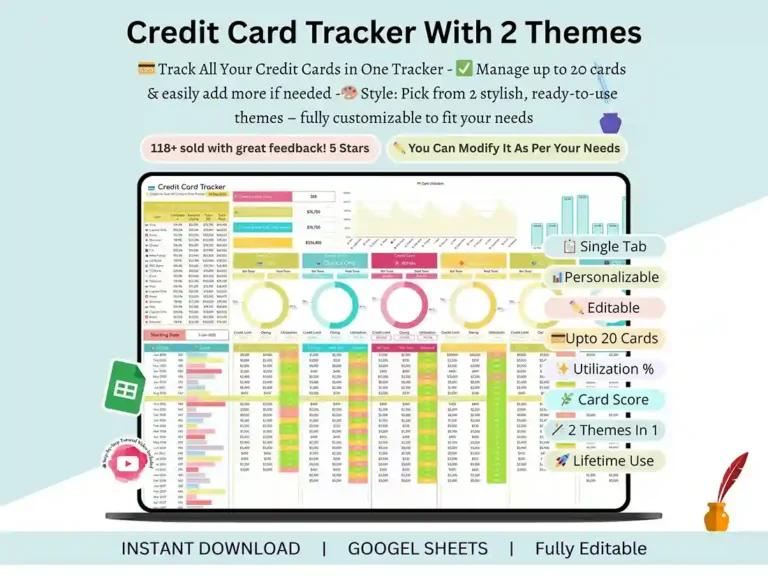
Managing more than one credit card usually means digging through several banking apps just to figure out what you owe. This credit card tracker solves that by pulling everything — balances, bills, and utilization — into a single, automated spreadsheet you actually want to open.
Add your cards once, and the sheet does the math. No formulas to build, no manual updates to remember.

Key Features
This credit card spreadsheet is built for anyone juggling multiple accounts:
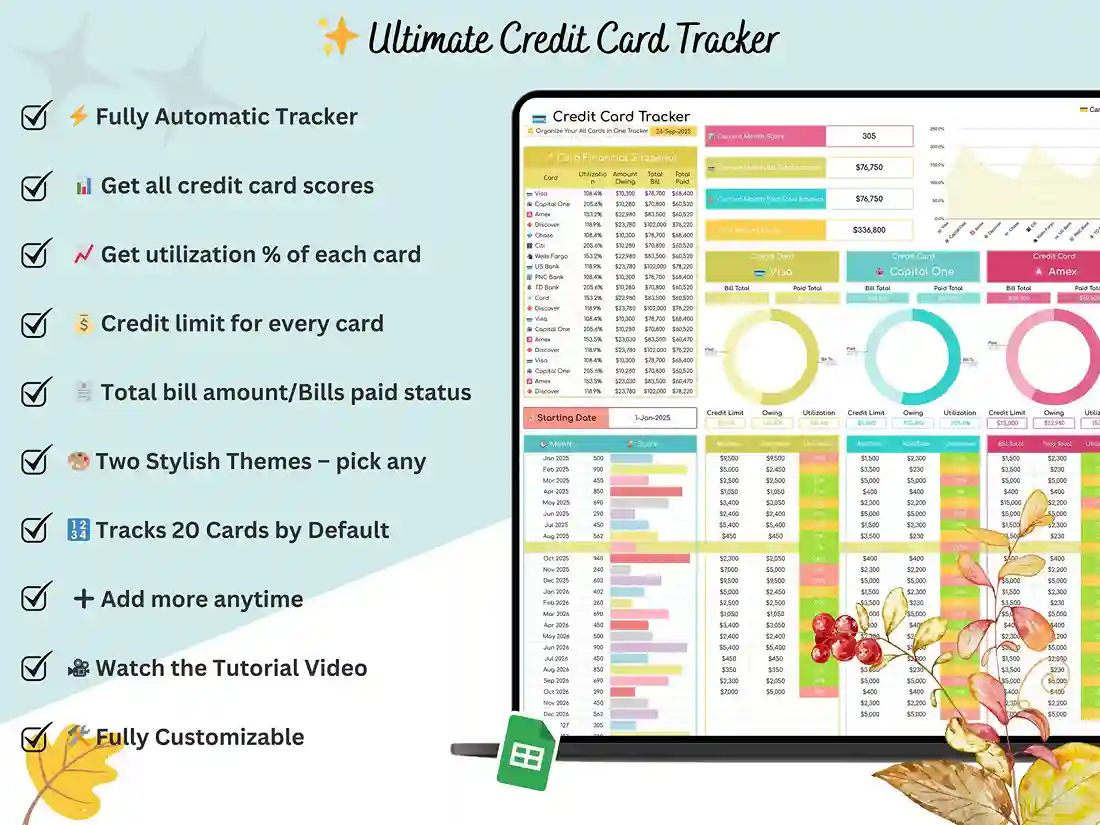
- Track up to 20 cards in one file — no separate tabs or documents to manage
- A financial snapshot table that shows total balances, bills, and utilization at a glance
- Two visual themes, so you can pick a layout that actually matches how you like to work
- A dedicated section for each card to log transactions and details individually
- Automatic utilization and balance calculations that update as you enter data
- Everything lives on one sheet — no clicking between tabs to find what you need
What You’ll Receive
You’ll get a fully built credit card excel template, delivered as a Google Sheets file with full Excel compatibility, along with a step-by-step video walkthrough covering setup and customization from scratch. If anything’s unclear, support is available directly — just reach out.
Who It’s For
This credit card tracking sheet works well if you:
- Carry balances on more than one card and want a clear, current view of all of them
- Run a small business and need to separate and monitor credit usage across accounts
- Are trying to keep utilization low to protect or improve your credit score
- Just want one place to check bills and balances instead of several banking apps
How It Works
- Purchase and download the file instantly — no waiting.
- Open the included link to access your credit card ledger template in Google Sheets.
- Enter your card details once, and the sheet calculates balances, bills, and utilization automatically from there.
FAQ
Does this work in Excel, or only Google Sheets? It’s built primarily for Google Sheets, and it opens and works correctly in Excel too. If you prefer Excel, just download the file as .xlsx after opening it.
Can I track more than 20 credit cards? The template is set up for up to 20 cards, which covers the vast majority of users. If you regularly manage more than that, reach out before purchasing and we can talk through options.
Does this calculate my credit utilization automatically? Yes. Once you enter your balance and credit limit for each card, utilization updates on its own — no manual math needed.
Is this a payoff or debt snowball calculator? No — this tracker is built for day-to-day balance and utilization tracking, not payoff planning. If you’re working toward paying down debt specifically, our Debt Tracker is built for that.
Do I need any special software to use this? No. All you need is a free Google account to use it in Google Sheets, or Excel if you prefer to work offline.
After purchase, how do I get the file? Instant download with purchase. No waiting for deliveries.



Reviews
There are no reviews yet.