


Description
Multiple Project Tracker – Google Sheets Dashboard Template
Juggling a website launch, two client jobs, and that course you keep meaning to finish? It gets messy fast. This multiple project tracker puts everything in one Google Sheet, so you’re not digging through five tabs and a notebook just to remember what’s due next.
If you’ve been hunting for a multi project tracker google sheets can actually run without add-ons or a monthly fee; this is the one. It’s a simple, editable sheet, and you can be up and running in an afternoon.
What’s Inside
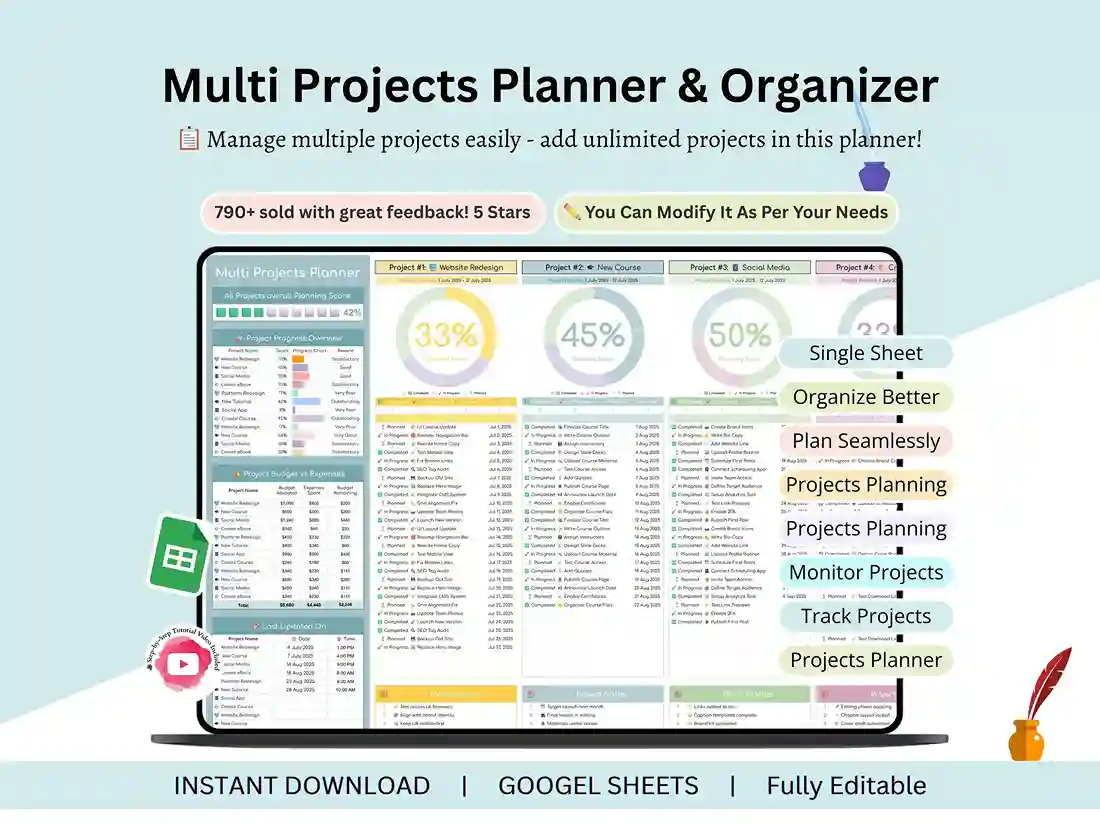
Think of it as a ready-made multiple project tracking template. You get 12 project sections to start with (need more? Add as many as you like; there’s no limit). Each one has its own notes area and start and end dates, so you always know when something kicked off and when it’s meant to wrap up.
The charts do the boring part for you. Fill in your progress, and they update on their own, which makes this a project progress tracker you don’t have to babysit. Budgets and expenses live inside each project too. That’s handy if you’re billing a client, or just trying not to overspend on a side venture.
Then there’s the fun stuff: rewards and score fields (yes, really) plus motivational icons and note sections. Staying on track is easier when it doesn’t feel like homework.
One Dashboard for Everything
It all feeds a summary page. It’s the project dashboard for multiple projects you’ll actually want to open each morning, a quick visual read on where everything stands before you’ve finished your coffee.
Who It’s For
Anyone with more than one thing on the go. Solopreneurs mapping out new ventures will find it useful, and so will students and course creators juggling assignments and launches. Designers lining up eBooks and websites can use it, as can project managers keeping an eye on timelines and deliverables. Content creators scheduling YouTube videos and social posts, freelancers with a handful of clients, and startup teams planning sprints and releases all fit too. And honestly, so does anyone who just wants a bit of order.
One note: this is a planning and tracking sheet, not a full project management software suite. That’s the point. It’s quick to learn and easy to bend to your own workflow.
How It Works
After you buy, the download arrives instantly. Inside is a PDF with a link to your Google Sheet. Click it, make your own copy, and start typing. You’ll need a Google account, and that’s about it. This project tracker template Google Sheets setup also includes a step-by-step video tutorial that shows you how to use and customize everything, so you won’t be left guessing.
Stuck anyway? Head to the contact page and I’ll help. Want to see what else is out there? Browse more project management templates.
FAQ
Does this multiple project tracker Google Sheets template work in Excel?
It’s built for Google Sheets, and that’s how it’s sold. You can download a Sheets file as .xlsx, but some charts and formatting may behave differently in Excel, so I can’t promise it’ll work the same way there.
How many projects can I track?
Twelve project sections come ready to use, and you can add more whenever you need them.
Is there a multiple project dashboard included?
Yes. A visual summary dashboard gives you an at-a-glance overview of all your projects in one place.
Can I use it as a project portfolio tracker?
For a personal or small-team portfolio, absolutely. You can see all your projects side by side. It isn’t an enterprise portfolio management system, though, so don’t expect resource planning or ROI scoring.
What do I get after purchase?
A PDF with a link to the Google Sheet, plus a step-by-step video tutorial. Delivery is instant.
Do I need a Google account?
Yes, you’ll need one to open and edit the sheet.
Reviews
There are no reviews yet.